General Page
This includes details for the length of time that can be requested up front for the environment with information on length of time allowed with extensions.
Table of Contents
• Duration Policies
• Quota Policies
• Workshop Policies
Duration Policies
Reservation duration policies are the length of time allowed to reserve an environment on a reservation form with additional insight into the length of time allowed to extend a reservation as well. Reference information below to learn about the current reservation duration policies in place today and where on the reservation form experience to look for these duration policies live.
Certified Base Images & Policy Changes – Effective August 5th (Changes are highlighted in the diagram below)
Starting Tuesday, August 5th, we’re introducing important updates to infrastructure duration policies across TechZone.
Please review the following changes:
1. IBM ROKS environments will once again require approval from the IBM Technology Zone team. Please confirm you have a valid ROKS opportunity before submitting a request.
2. OCPv Infrastructure Duration Policy Update. For OCPv-based environments, the following new duration policies will apply.
Demo: 63 days → 27 days
3. watsonx education policy update.
- Education: 14 days → 8 days
- If you already have one reservation and need another, simply delete the old reservation before creating a new one.
Note: This change does not affect existing IBM Training or IBM Enablement Course policies.
Updated Limit: 2 → 1 reservation at a time.
Certified Base Images & Policy Changes – Effective August 14th (Changes are highlighted in the diagram below)
Starting Thursday, August 14th, we’re introducing important updates to infrastructure duration policies across TechZone.
Please review the following changes:
SaaS Orchestrate Trial reservation duration updated to align with trial period lengths in reservations.
NOTE: Expired trials within active reservations can't be restored - create a new reservation to start a new trial.
Demo: 35 days → 30 days
- Pilot: 65 days → 30 days

Definitions: - Vendor Provided: Self-education resources are accessible through the respective 3rd-party platform
Use Case: The infrastructure of the environment being reserved broken down by the purpose in which the environment is being used for. This information is captured on the reservation form to determine the duration policy per reservation.
Default Reservation Days: On the reservation form, this duration is the default amount of time, pre-selected, on the end date field.
Extension Days: After a reservation has been created with the initial default reservation days (per above), leverage the self-service extension option to extend for this length of time.
Max Extensions: The total number of extensions allowed for the reservation.
Max Days: Total time the environment can be reserved if all extensions are used.
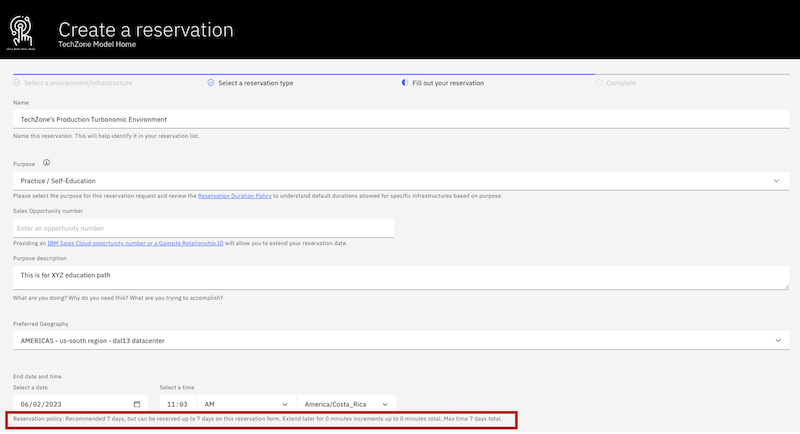
Duration Policies Displayed On Every Reservation Form
Duration policies can be found on every TechZone environment reservation form directly below the end date field. This helper text below the date picker field will explain in detail the default recommended duration for the reservation being created with further guidance on the amount of time allowed per extension and how many extensions this reservation will have. If all extensions are used, as stated in the helper text the total amount of time that the environment can be reserved for is provided as additional guidance.
NOTE: Client facing purpose reservations (Customer Demo, Proof of Concept, Proof of Technology) have policies in place today to provide more time to those that are reserving environment for client demonstrations.
Q: What happens if the environment duration policy changes after I have already made a reservation?
Duration policies for environments may change over time — increasing or decreasing based on updates to resource planning and availability.
Here's what you can expect:
If the duration increases: Your existing reservation will gain extensions automatically. No engagement with support team needed.
If the duration decreases: Your reservation’s extension limit may be reduced, but don't worry — we will always honor the policy that was in place at the time your reservation was created.
Important: The reservation end date does not automatically change when the policy changes. Only the number of allowed extensions is affected.
To request a review of your reservation under a previous policy:
Please open a support case with the TechZone team and include your reservation ID and environment details.
If you need more time urgently, we also recommend using the AskTZ emergency extension option, which provides temporary relief while your request is being reviewed.
Workshop Manager Policies
All workshop requests must be submitted 5 business days before the intended workshop start date/time. Any requests before the 5 days time frame will not be able to submit the request form.
IMPORTANT: It is best practice to make a request for preferred dates and times through Workshop Manager in advance to secure capacity and get the environments you need for a successful workshop.
We strongly advise that you receive approval before advertising and finalizing details with your attendees (external or internal) as capacity may not be available for the preferred dates. Please plan accordingly.
For requests that exceed the maximum duration of 5 working days, the maximum of 30 environments, or has a lead time of less than 5 days, an exception request is required for further executive approval.
Follow the steps below for exception request process:
1. Schedule your workshop with the requested duration, total number of environments needed and available start date.
2. Open a Support case with the following information provided:
Subject/Title: Workshop Manager extension exception request
- Workshop Details: Include the Workshop name and URL.
- Business Justification: Provide additional business justification for needing this exception.
Workshop Type: Specify whether the workshop is external or internal.
External workshops are tied to an engagement with a customer and a valid IBM Sales Cloud opportunity code should be provided
Internal workshops are tied to an internal IBM go-to-market teams enablement and the IBM Group/Team name should be provided
Quota Policies
A reservation quota policy contains predefined restriction for users making reservations on IBM Technology Zone. Quota policies are in place to ensure appropriate allocation of resources and prevent overutilization. Leverage the information below to understand current reservation quota policies in place today and how we will notify you on the reservation form experience if you are violating a quota policy.
Current Quota Policies as of August 25th, 2023:
Self-Education Quota Policy = Maximum 2 "Practice / Self-Education" reservation(s) permitted at a time per user.
Quota Policy Violations
Quota policy violation notices are triggered from the reservation form when users make a reservation that violate an existing quota policy. Every notice will include the quota policy that was violated along with the associated reservation ID's.

IMPORTANT: There are no exceptions to quota policies at this time.
Additional Guidance:
- Failed reservation statuses do not count against your existing quota.
- If you made a self-education reservation and it failed, please provision a new instance.
- A net new self-education reservation can NOT be scheduled in advance if you have two existing reservations. You can delete one or wait for one or both to expire before making the next self-education reservation.
GPU Quota Policy
Each user is limited to one GPU reservation at a time. GPU resources are strictly for client-facing purposes only and are not intended for internal testing or personal educational use.
At this time, GPU requests are reviewed manually—similar to custom environment requests. Please allow up to 5 North American business days for review and approval. To ensure availability, we strongly recommend submitting your request at least two weeks prior to when the environment is needed. Submitting earlier may help justify allocation based on resource planning.
Support
For any inquiries, questions, or support, please reach out to our team by creating a support case.
Was this topic helpful?
Document Information
Modified date:
02 December 2025
UID
ibm17159469